CI/CD
This chapter describes the complete implementation of Continuous Integration and Continuous Deployment (CI/CD) in the Keyla-TTT project, including continuous integration pipelines, automated release processes, pre-commit hooks, and Docker image management.
1. CI/CD Architecture
The Keyla-TTT project implements a multi-repository CI/CD architecture that coordinates three main components:
- Keyla-API: Scala Backend with SBT
- Keyla-CLI: Kotlin Multiplatform Application with Gradle
- Keyla-RELEASE: Release repository that aggregates components and produces Docker images
Development Workflow
The project adopts a GitFlow-based workflow with the following branches:
develop: Integration branch for new featuresmain: Stable production branchhotfix/: Branches for bug fixingfeature/*: Branches for new feature development
Commit Conventions
The project uses Conventional Commits to standardize commit messages, enabling automated versioning and changelog generation.
2. Pre-commit Hooks
The project implements separate pre-commit hooks for backend and frontend to ensure code quality before every commit.
Backend - Pre-commit Hook
The Scala backend implements a pre-commit hook that ensures code quality before every commit. The hook automatically identifies modified Scala files and runs formatting checks scalafmtCheck and static analysis scalafixAll --check. If any checks fail, it automatically applies corrections using scalafmtAll and scalafixAll, then adds the corrected files to the commit.
Frontend - Pre-commit Hook
The Kotlin frontend also implements a pre-commit hook. The hook runs code quality checks using ktlintCheck and detekt, auto-formats code with ktlintFormat if issues are found, and then executes the complete test suite with allTests. The commit is blocked if any check fails.
Commit Message Validation
Both backend and frontend use a commit-msg hook that validates commit a message format according to Conventional Commits standards. The hook enforces the pattern type(scope): description where type must be one of: feat, fix, docs, style, refactor, test, chore, perf, ci, build, or revert.
3. Continuous Integration Pipelines
API - CI Pipeline
The CI pipeline for the API is defined in .github/workflows/scala.yml and triggers on pull requests to develop and main branches. The pipeline consists of four main jobs:
- Setup: Configures the environment
- Format: Verifies code formatting using
scalafmtCheckAll - Lint: Performs static analysis using
scalafixAll --check - Test: Runs the test suite with code coverage reporting using Scoverage, then uploads coverage reports as artifacts

Frontend - CI Pipeline
The CI pipeline for the frontend is defined in .github/workflows/kotlin.yml and triggers on pull requests to develop and main branches. The pipeline consists of three main jobs:
- Setup: Configures the environment with JDK and caches Gradle dependencies
- Check: Runs code quality checks using
ciCheckCodewhich includes ktlint and detekt - Test: Executes the JVM test suite and uploads test results as artifacts

4. Automated Release Process
Release Triggers
The release process is triggered by pushes to the main branch of each repository.
API Release
The Scala release workflow consists of three main jobs:
- Documentation Generation: Creates API documentation using SBT
- Deploy Documentation: Deploys the generated documentation to GitHub Pages
- Semantic Release: Builds the ZIP package, automatically determines version number from commit messages,
- creates GitHub release, and triggers Keyla-RELEASE repository

Frontend Release
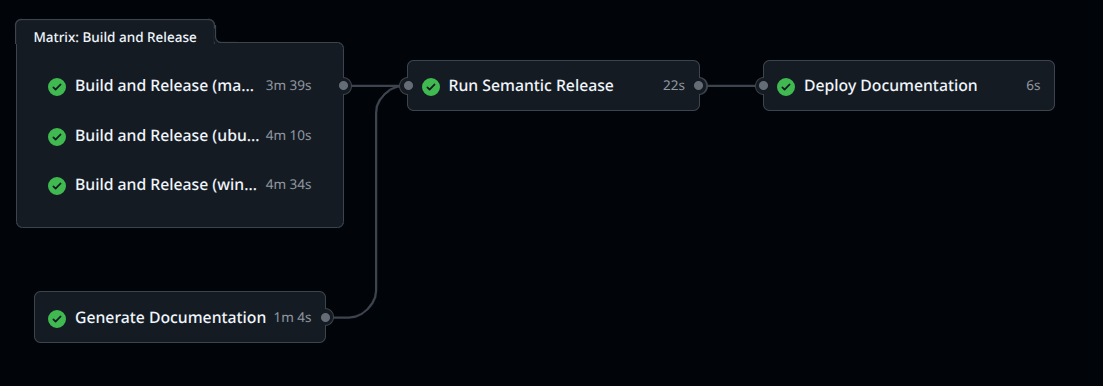
The Kotlin release workflow consists of four main jobs:
Matrix Build Job: Compiles CLI binaries for three platforms in parallel:
- Linux x64
- macOS ARM64
- Windows x64
Documentation Job: Generates documentation using Dokka
Publish Job: Uses semantic-release to create GitHub release with all platform-specific binaries attached, then triggers Keyla-RELEASE repository
Deploy Documentation Job: Deploys the generated documentation to GitHub Pages
5. Release Repository and Containerization
Keyla-RELEASE Repository
The Keyla-RELEASE repository aggregates released components and produces Docker images. It's triggered by repository_dispatch events from API and CLI repositories.
Complete Process:
- Trigger: Activated by API or CLI release via
repository_dispatch - Resolve Tags: Determines latest versions of both components
- Download Assets: Downloads API ZIP package and CLI binaries
- Create Combined Tag: Generates combined tag
v<api_version>.<cli_version> - Build Docker Image: Creates and publishes Docker image to Docker Hub
- Create Release: Creates GitHub release with combination details
The workflow resolves the latest versions of both components when one is released, downloads the appropriate assets, creates a combined version tag, builds a Docker image that includes both the API and CLI components, and publishes it to Docker Hub with both the specific version tag and the latest tag.
Docker Image
The final Docker image (keylattt/keyla) combines:
- Backend API: ZIP package of the Scala application
- CLI Binaries: Native executables already installed
- Dictionaries: Dictionary files for typing tests
The Docker image includes all necessary components for running the complete Keyla application.
6. Automation and Code Quality
Quality Tools
Scala (API):
scalafmt: Automatic code formattingscalafix: Static analysis and automatic refactoringscoverage: Code coverage
Kotlin (Frontend):
ktlint: Kotlin code formatting and lintingdetekt: Static analysis for Kotlindokka: Documentation generation
7. GitHub Integration
- Pull Request Checks: Automatic checks on every PR
- Release Notes: Automatic release notes generation
- Changelog: Automatic changelog based on commits
- GitHub Pages: Automatic documentation deployment